An error message is part of an interface. Someone reads it while trying to finish a task or understand a failure. Give that person enough context to choose the next step.
Describe the failed operation
Compare these two messages:
Operation failed.
Could not import customers: row 18 has an empty email address.
The second message names the operation, points to the problem, and provides a starting point for a correction.
Separate user guidance from diagnostic context
A person importing a file needs to know what to fix. A developer investigating a service needs the operation, a request identifier, and the underlying error.
| Reader | Useful information |
|---|---|
| Person using the application | What failed and what to do next |
| Support team | A reference that connects the report to logs |
| Developer | Operation, cause, and relevant diagnostic context |
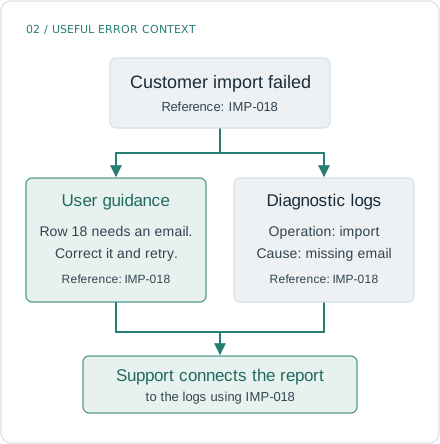
Give the person reporting the error a reference that also appears in your logs. Support can use it to find the failure without asking for internal details.
These needs overlap, but they do not require exposing internal details in the interface. Avoid placing credentials, access tokens, or personal records in error messages or logs.
Make recovery concrete
Use a message structure you can apply consistently:
- Name what failed.
- State the cause when it is known.
- Give an action the reader can take.
For a file upload, that might look like this:
The file exceeds the 10 MB upload limit. Choose a smaller file and try again.
The limit belongs in the message because the reader needs it to act. “Invalid file” leaves the next step unclear.
Do not promise a safe retry without evidence
A timeout tells you that a response did not arrive in time. It does not prove that the remote operation failed. If the request can change data, check its status or use a deduplication mechanism before asking someone to repeat it.
For a local read operation, “Try again” may be appropriate. For a remote write, the interface may need to say that the result is still being checked.
Review errors alongside successful flows
During a feature review, look at the empty states and the failure paths too. Ask whether each message helps its reader:
- Find the affected input.
- Understand a known constraint.
- Decide whether to retry, correct something, or contact support.
- Share a useful reference without sharing sensitive data.
Clear messages reduce the amount of investigation a user must do before returning to their original task.